Database Role Design for Non-Technical Business User Access
Self-service data access requires thoughtful permission design, not just database credentials.
Database Role Design for Non-Technical Business User Access.
Why non-technical teams can't get answers fast enough
A product manager needs conversion numbers to finalize a pricing call. Finance wants regional margins broken down before a leadership meeting. Customer success needs churn cohorts ahead of a board update. All three land in the same BI queue, behind a pile of dashboard maintenance work and half-finished SQL tickets. None of these are exotic requests. They're the normal, everyday questions a business asks itself. And all three are now stuck in line.
By the time answers come back, the decision has usually already been made, just without the data that was supposed to inform it. That's the real cost here, and it's not a scheduling problem. It's strategic. A pricing call made a week late, without the conversion numbers that should have shaped it, is a strategic cost. It's a worse decision, made with worse information, because the information arrived after the deadline instead of before it.
The numbers back up how widespread this has become. Dresner Advisory Services' Wisdom of Crowds study found that 78% of enterprises now consider self-service analytics "critical" or "very important," up from 52% in 2020 Dresner Advisory Services Wisdom of Crowds. So the appetite for self-service is not new, and it's not fringe. What's telling is the gap between that appetite and what's actually been built. Most companies say they want this. Few have actually pulled it off Dresner Advisory Services Wisdom of Crowds.
Faced with that gap, the tempting shortcut is to just hand out database access and call it solved. That instinct is the wrong fix. Raw production credentials in the hands of someone who doesn't know what a WHERE clause does is how a DELETE statement wipes out a table instead of a row. It's how a support rep who means no harm at all ends up with a query result that includes every customer's payment token. Access without structure is a liability with a login screen. It's a liability with a login screen.
The actual fix is designed access: scoped, permissioned, and safe by construction." It's designed access: scoped, permissioned, and safe by construction, not by good intentions. That's what the rest of this piece builds, one decision at a time. Per a Gartner survey of 400+ enterprise data teams, organizations with self-service analytics programs make decisions up to 3x faster than those relying on centralized reporting teams, according to the Gartner Analytics and BI Platform Adoption Report.
What role-based access control means for a database team
Role-based access control, RBAC, sounds like a settled, boring acronym. RBAC sounds like a settled, boring acronym, and yet it demands constant attention. It's an ongoing practice, not a one-time setup you configure and forget. A working RBAC system has to flex with the org chart, the security posture, and whatever operational mess is happening that quarter.
Three concepts produce this behavior, and keeping them separate is the whole game. Permissions are the atomic units: SELECT on a specific table, CONNECT to a specific database. Roles are bundles of those permissions, built around a business function. Users get assigned one or more roles, not locked into a single one for life.
Separating these three affects how permissions are granted, tracked, and revoked without breaking unrelated access. Consider a support engineer who occasionally helps out with onboarding. Compare that to the alternative, where a company just clones an existing employee's permission set for the new hire. That's the "Bob model," and it's an anti-pattern for a reason: it produces access rights nobody documented, nobody can trace back to a decision, and nobody can audit later. Probably because Bob could, for some reason lost to history.
RBAC is not, by itself, a security solution. A poorly configured RBAC system is arguably worse than no system at all, because it creates the feeling of control while leaving the actual holes wide open. What turns RBAC from a checkbox exercise into something that actually works comes down to three habits, held together: least privilege as the default assumption, assignment by role rather than by individual user, and a regular cadence of review. Skip any one of the three and the other two don't hold much water.
Designing roles around business functions, not job titles
Naming roles after job titles looks reasonable on day one and turns into a mess later. IT Admin. Those names break the moment someone covers a colleague's work for a week, a new hire wears multiple hats, or a reorg changes titles without changing responsibilities. Job titles are brittle. They break under exactly the kind of organizational shuffling that happens constantly at a growing company.
The fix is to name roles after the business function itself, something that tends to outlive whatever the org chart is doing this quarter. "Customer Data Management" instead of "Sales Manager". "System Configuration" instead of "IT Admin". "Invoice Processing" instead of tying a role to a specific person's name or title at all. Notice what happened there: none of those role names describe a person. They describe a job that needs doing, independent of who's doing it this month.
How do you know if a role is drawn at the right altitude? If roughly 80% of the people holding a role need roughly 80% of the permissions bundled into it, the abstraction is at the right level OsoHQ RBAC Best Practices. If that ratio is way off, either in one direction (most people only use a sliver of what they're granted) or the other (people keep needing exceptions), the role is drawn wrong and needs to be split or merged.
Granularity itself isn't a fixed target. It should track how fast the org is changing. A fast-growing startup benefits from smaller, more atomic roles that can be reassigned quickly as people's jobs shift under them week to week.
Exceptions are where role systems usually start to rot, so plan for them on purpose instead of pretending they won't happen. Before creating a one-off role for a single person's odd situation, ask a simple question: could this need come up again for someone else? A yes means the situation isn't an exception but a new standard role waiting to be named. When an exception really is a one-off, document it, get it approved, and where the system supports it, put an expiration date on it. A support agent who needs billing access for a single escalation gets a "Billing Support" role that's time-limited, not a permanent bolt-on to their existing access.
It helps to start from a short list of common business-user archetypes rather than designing every role from a blank page. A read-only analyst in marketing or product needs SELECT access on safe tables and views, full stop, no write access anywhere. An operations reviewer needs read access to operational tables, and maybe narrow update rights on a status field or two. A finance auditor needs read access to billing and revenue tables, but explicitly no access to PII columns sitting in those same tables. Customer success needs read access to account and subscription data, scoped to the accounts they're actually assigned to, not the whole customer base. A support agent needs read access to ticket and user tables, with certain columns, payment tokens and password hashes among them, walled off entirely.
It's a set small enough for one person to actually administer, but granular enough that nobody's sitting on access they never touch.
Building the read-only analytics role from first principles
The single most common shortcut, and the most dangerous one, is reusing the application's own database user for analytics. It can write. It can usually read basically everything in the database. And it's the path of least resistance under a deadline, which is exactly why engineering teams reach for it. Resist that. Always build a dedicated, minimal role from scratch instead.
There's a second anti-pattern that's just as dangerous and far less obvious: hiding sensitive fields only in the dashboard's front end. If a payment token or a password hash is filtered out purely at the UI layer, anyone who opens their browser's network inspector, or exports the raw query result, can still see it. The restriction has to live in the database itself, not in whatever's rendering the chart on screen.
Setting up the role involves stacking permission layers where a missing USAGE grant on the schema blocks every query with a confusing error even if table-level SELECT is granted; this is done via GRANT CONNECT ON DATABASE and GRANT USAGE ON SCHEMA. Skip the schema-level USAGE grant, and every query fails with a cryptic message, even though the table-level SELECT permission is sitting right there, granted and ready. Then GRANT SELECT ON ALL TABLES IN SCHEMA covers whatever tables already exist.
Almost everyone forgets ALTER DEFAULT PRIVILEGES IN SCHEMA GRANT SELECT ON TABLES TO analytics_ro. Without it, a table shipped next month is invisible to the analytics role by default, and someone spends an afternoon debugging what looks like a permissions bug but is really just a missing default.
"Read everything" isn't actually the goal, either. An analytics role has no business reading password_resets or internal_audit_log. Grant SELECT on the specific tables and schemas that answer real business questions, and explicitly leave the sensitive system tables out of the grant entirely.
For tables that mix safe and sensitive columns in the same row, column-level restriction handles what table-level grants can't. Revoke the broad SELECT on the sensitive table, then re-grant only the columns that are actually safe: id, email, plan, country, created_at. Try to select password_hash or stripe_customer_id under that role, and the query fails outright. SELECT * will fail too, and that's a feature, not a bug: it forces an explicit column list and makes an overly broad query visible the moment someone writes it, instead of quietly leaking data nobody meant to expose.
For actual day-to-day use by non-technical people, raw tables are still the wrong surface. Views clean that up. CREATE VIEW reporting.active_customers gives users something self-documenting to query, without ever touching the underlying tables, joins, or sensitive columns directly. It also decouples the schema from what business users actually see, so a schema change on the backend doesn't necessarily break every dashboard built on top of it.
A statement timeout is one more layer worth setting before calling this role finished. ALTER ROLE analytics_ro SET statement_timeout = '30s' cancels a query instead of letting an expensive one pin the CPU. A non-technical user has no way of knowing that a cross join across two large tables is expensive to run. The timeout cancels the bad query instead of letting it pin the CPU for everyone else. Where it's an option, point this traffic at a read replica rather than the production database itself, so that even a runaway query that somehow slips past the timeout can't degrade production for the people relying on it in real time. The read-only analytics role is built from first principles using CREATE ROLE analytics_ro WITH LOGIN PASSWORD, starting from nothing with no inherited privileges.
Row-level and column-level security for cases where table access alone is not enough
Table-level grants answer "can this role see this table." They don't answer a narrower, and often more important, question: within a table this role can see, whose rows should it actually see? Customer A shouldn't see customer B's orders. A regional sales rep shouldn't see every other region's revenue. A support agent shouldn't be able to read every customer's payment token just because the ticket table happens to sit next to it. Table-level access alone doesn't solve any of that. Row-level and column-level security do.
Row-level security, RLS, in PostgreSQL works by attaching policies to a table that restrict, per user, which rows a normal query is even allowed to return. By default, a table has no such policies at all, and every row is equally visible to anyone holding SELECT. RLS is what changes that.
The real strength of enforcing this at the database layer, rather than in application code, is consistency. The policy runs at the engine level, so the same rule applies consistently across every access path, BI dashboards, notebooks, ad-hoc SQL, APIs, third-party tools, and cannot be bypassed by a missing WHERE clause in application code. One rule, applied everywhere, and it can't be bypassed just because someone forgot a WHERE clause in application code.
A tenant isolation setup shows how compact this actually is. ALTER TABLE orders ENABLE ROW LEVEL SECURITY turns the feature on. CREATE POLICY tenant_isolation ON orders USING (tenant_id = current_setting('app.current_tenant')::int) defines the rule. The application sets the current tenant once per session, and from that point on, every query against orders, even a bare SELECT *, only returns that tenant's rows. Application code has leaked entire customer tables before over a single missing filter; RLS holds the guarantee even when the query itself is careless.
Databricks handles the same idea through Unity Catalog's row filters: define a SQL user-defined function that returns true for the rows the current user is allowed to see, attach it to the table, and the filter runs automatically at query time based on who's asking.
RLS decides which rows a user sees. Column-level security decides which fields within those rows they see. Combine both and the effect is cell-level control, the right rows and the right columns, enforced independently. Microsoft's Column-Level Security feature in Azure Synapse works this way, controlling access to specific columns based on a user's execution context or group membership, which simplifies the security design on the application side considerably.
Performance deserves a real mention here, not a footnote. RLS policies run before a query's own filters, so a predicate referencing an unindexed column turns into a full table scan on every single secured query. Predicates that stay join-free, and functions written to evaluate once per query rather than once per row, keep that overhead low. Done well, RLS adds single-digit percentage overhead. Done carelessly, it causes an unexplained slowdown that appears on every secured table and takes forever to trace back to its source.
The semantic layer: translating a permissioned database into something business users can query
Locking the data down is only half the job. Even with a perfectly scoped, perfectly safe read-only role sitting in front of a well-indexed database, an operations lead is not going to sit down and write a window function. The job also requires giving that person an interface that doesn't require SQL at all.
That's the gap a semantic layer fills. It's a standardized translation layer that sits between raw data storage and whatever tool people actually use to look at it, turning cryptic table names, multi-table joins, and raw column names into concepts a business user already understands: "MRR," "Active Users," "Churn Cohort," instead of mrr_cents and subscription_status.
Without one, a familiar and expensive problem occurs: every team quietly builds its own definition of "Active Users," and pretty soon marketing, product, and finance are all citing different numbers for what should be the same metric, and nobody can agree on whose report is right. A semantic layer forces one definition, defined once, used everywhere.
The efficiency gain here isn't small.
There's also a newer, sharper reason this matters: AI medium.com. Gartner's 2025 guidance treats semantic technology as effectively non-negotiable for AI systems to work reliably medium.com. A survey of more than 330 data teams put average confidence in AI-generated query results at just 5.5 out of 10, and, oddly, people with deeper technical knowledge trusted those outputs even less than less-technical respondents did medium.com. A governed semantic layer is the thing standing between a confident-sounding AI answer and a wrong one, because it constrains what the AI is even allowed to query in the first place medium.com.
For actually reaching non-technical users, three interface approaches tend to appear, and each fits a different kind of question. Prebuilt dashboards, where the query is written once and users just filter and view, work best for the recurring KPIs everyone already watches every week. A semantic layer paired with a drag-and-drop interface, where metrics are defined centrally but users compose their own questions from them, fits teams asking varied but related questions week to week. Text-to-SQL / AI query, where the AI generates SQL from natural language, changes the security model rather than replacing it (the read-only role and column grants become more important, not less, because a hallucinated or over-broad AI query needs guardrails).
A few named tools show where this space is heading, each on its own terms. Snowflake's Semantic View Autopilot, announced in early 2026, moved Snowflake's native semantic views away from complex manual modeling toward AI-powered automated generation. Databricks Metric Views, announced in 2025 and reaching general availability in April 2026, gives organizations already standardized on the Databricks lakehouse a native semantic layer without standing up separate infrastructure. The dbt Semantic Layer works as a translation layer between business metrics and the data structures underneath them, letting both technical and non-technical people define and manage metrics through MetricFlow, which turns YAML metric definitions into SQL. For multi-BI or multi-platform environments, universal, headless options like Cube, AtScale, and GoodData work across platforms rather than being native to a single warehouse.
Whichever route gets picked, one rule carries over from every earlier section: point the AI query tool or semantic layer at the restricted analytics role and the curated reporting views built earlier, never at a superuser connection. The database-layer controls covered above are exactly what make self-serve access safe, even when the thing writing the query is a language model instead of a person. Organizations implementing semantic layers report achieving 4x faster time-to-insight as business stakeholders access consistent, pre-defined metrics without waiting for data engineers to construct custom queries, per Promethium's guide Promethium AI.
Choosing and configuring the BI tool that sits in front of the permissioned database
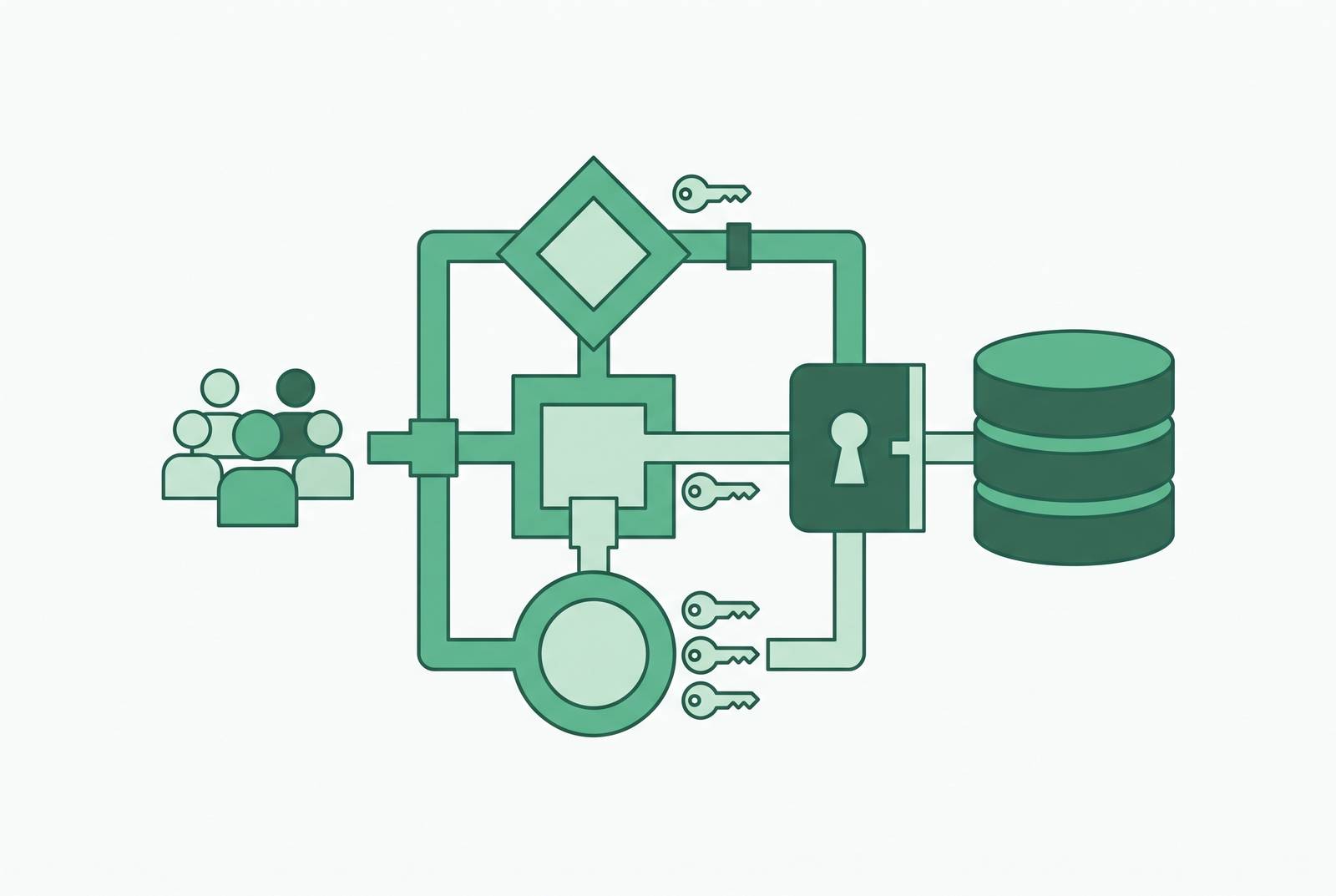
By this point, the security work is essentially done. The role is scoped. The columns are restricted. The rows are filtered by tenant or by account. The semantic layer is translating raw schema into business language. What's left is the interface: the actual tool a non-technical person opens up in the morning.
That tool has exactly one job, technically speaking, even though it looks like many. It needs to connect to the database, or better, to a read replica, without requiring some separate data warehouse to be stood up first. It needs to respect the role boundaries and row-level policies that are already in place, not work around them. And it needs to present the data in a form a non-technical user can actually navigate without ever touching SQL.
The tool is not where the security lives. The role design and the row-level security did that work already. The tool's entire job is the interface sitting on top of it. Get the roles right, get the row and column filters right, and the choice of tool becomes a much lower-stakes decision, one about usability and fit rather than one where a wrong pick quietly exposes a customer's payment token to someone in marketing who just wanted to know last month's conversion rate.